Skunk Audio OPEN STUDIO
ANDROID PRODUCTION STUDIO · v1.0

The whole studio.
On your phone.

Sixteen sampler pads, a pattern sequencer, twenty synth engines, a sample editor, a mixer and a real recorder — in one app, running on one audio engine. Built for phones from the first line of code, not shrunk down to fit them.

Coming to Google Play See it in action
ENGINES
20+
PADS
32 · 2 BANKS
EXPORT
WAV · STEMS · MIDI
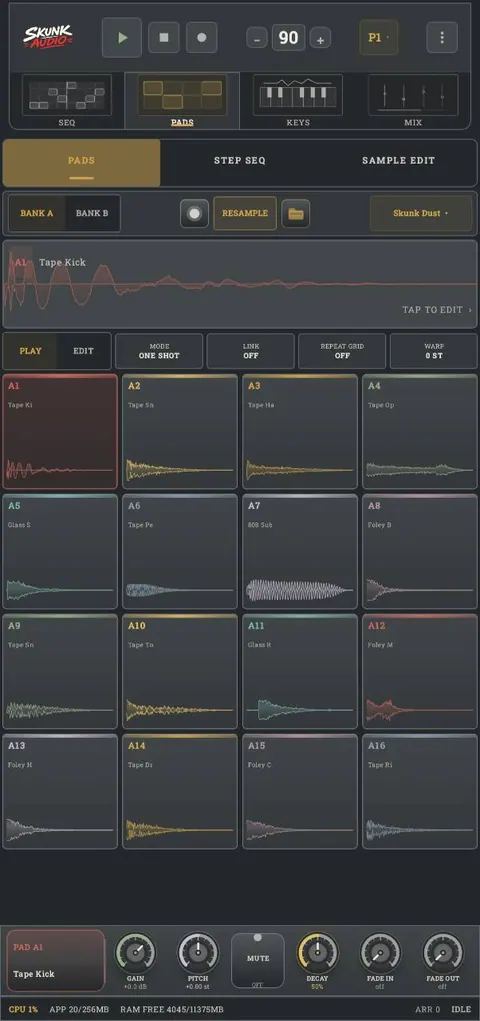
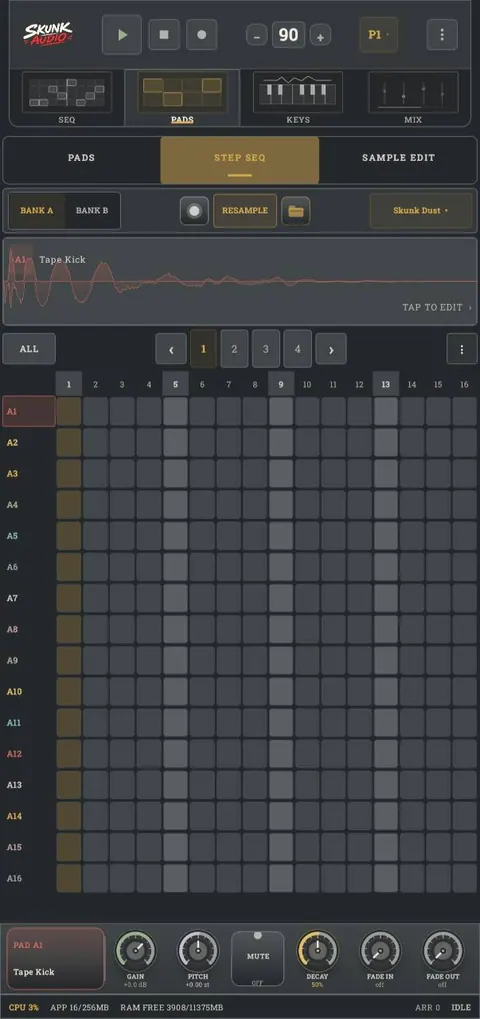
The Skunk Audio pattern sequencer, showing tracks for kick, snare, hats and bass across a sixteen-step grid The Skunk Audio pad bank, showing sixteen pads each with its own waveform and colour
FOUR SCREENS

One app, four rooms.

Everything runs through a single audio graph — a pad you tune on PADS sounds identical when SEQ plays it and when you bounce it to a file.

SEQ Pattern engine

Build patterns track by track. Add as many tracks as the song needs, draw steps across four bars, and set velocity per hit. Every track carries its own volume, pan and reverb / delay sends, so the mix takes shape while you write.

  • Unlimited tracks per pattern
  • Per-step velocity
  • Bar-by-bar editing
  • Mute and solo per track
The SEQ screen in Skunk Audio

PADS Beat lab

Two banks of sixteen pads, each showing its own waveform. Load a kit, drop in your own samples, or resample whatever is playing straight back onto a pad. Pitch and gain sit under your thumb.

  • Bank A and Bank B
  • One-shot, loop and warp modes
  • Resample to pad
  • Pad link and repeat grid
The PADS screen in Skunk Audio

KEYS Performance engines

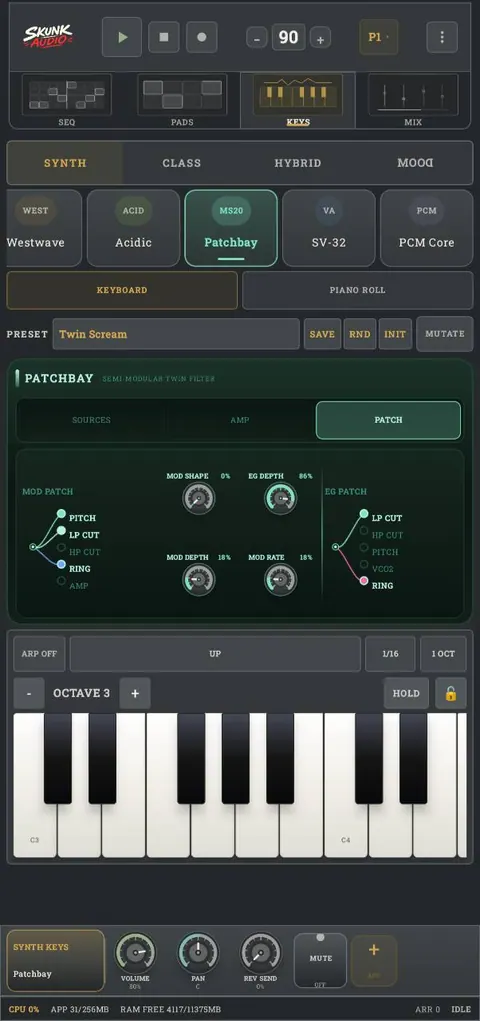
Twenty synth engines across four families — wavetable, FM, hybrid, chordal and more. Each has a real panel with voice, filter, amp and modulation pages. Play them on the keyboard or write them in the piano roll.

  • Pulse, Vortex, FM-X, Chordial and more
  • Keyboard or piano roll
  • Arpeggiator with rate and range
  • Randomise, init and mutate presets
The KEYS screen in Skunk Audio

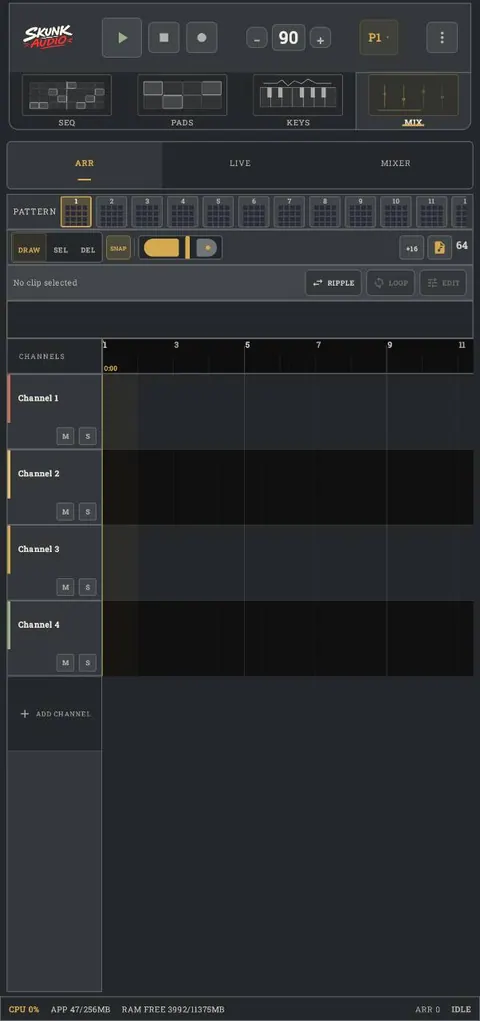
MIX Studio engine

Chain patterns into a full arrangement on a timeline, or fire them live. Channels get mute, solo and colour coding; clips snap, ripple and loop. When the track is done, it bounces from here.

  • Arrangement timeline
  • Live pattern launching
  • Full mixer with sends
  • Eight pattern slots
The MIX screen in Skunk Audio
HOW IT WORKS

Idea to finished track, without leaving your phone.

  1. 01

    Pick a kit, tap out a beat

    Sixteen pads with waveforms on every one. Hit them live or draw the pattern into the step grid.

  2. 02

    Write the parts

    Add tracks for bass and melody, choose a synth engine, and play it in from the keyboard or the piano roll.

  3. 03

    Shape the sound

    Chop and tune samples in the editor. Reverse, normalise, fade, warp. Set levels, pan and sends per track.

  4. 04

    Arrange and export

    Chain your patterns on the timeline, then bounce to WAV, split out stems, or export MIDI for another DAW.

ALSO INSIDE

The parts you only notice later.

Sample editor

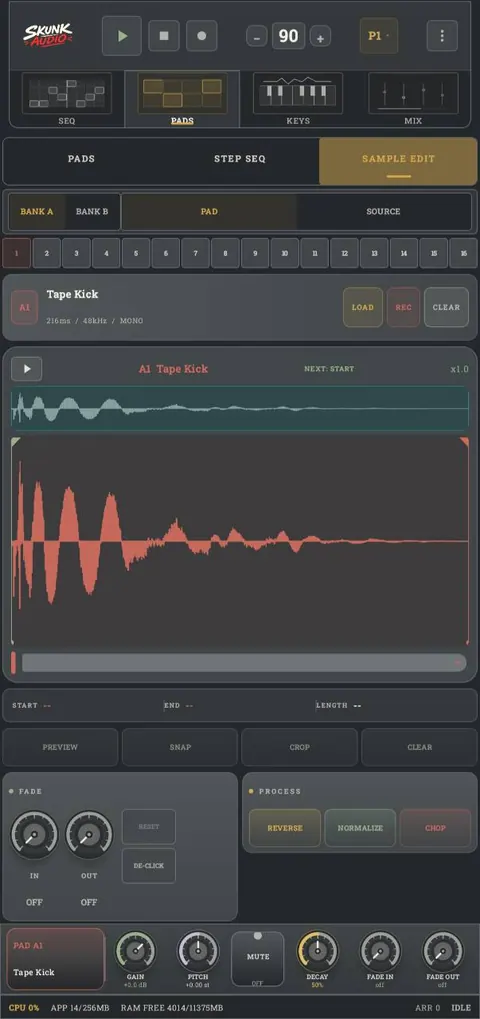
Trim, crop, snap to zero crossings, fade in and out, de-click, reverse, normalise and chop — all on the waveform.

Real recorder

Record vocals over the beat with monitoring and takes. Nothing overwrites the last one.

Resampling

Bounce whatever is playing back onto a pad and keep building on top of it.

Export options

Full-quality WAV, separate stems, or MIDI to carry the idea into a desktop DAW.

Idea capture

Catch a melody the moment it lands, before the arrangement exists.

Runs light

A live CPU and memory readout sits at the bottom of the screen. It is built to stay glitch-free on a phone.

The Skunk Audio sample editor, showing a waveform with start and end markers, fade controls and reverse, normalise and chop buttons
SAMPLE EDITOR

Chop it where you want it.

Every sample opens on a full waveform with draggable start and end markers. Snap to zero crossings, crop, fade, de-click, reverse, normalise, or chop it across pads in one move.

TRY BEFORE YOU INSTALL

A taste of the engine, in your browser.

Not the app — a small demo built on the same voice designs, so you can hear where it's coming from without installing anything.

BPM
90
SWING 0%
PATTERN
TAP THE GRID · 8 TRACKS · 16 STEPS · RUNS IN YOUR BROWSER FULL STUDIO →

THE FULL STUDIO IS THE ANDROID APP · OPEN THE BROWSER DEMO →

GET STARTED

Make something.

Skunk Audio is a one-time download with no subscription, no account and no cloud. Your projects live on your device.

Coming to Google Play Read the journal